
What Are UTM Parameters and Why Should You Care?
UTM parameters are short text tags appended to a URL that tell your analytics platform exactly where a click came from, how it arrived, and which campaign sent it. The acronym stands for Urchin Tracking Module — a leftover name from Urchin Software, the company Google acquired in 2005 to build Google Analytics.
Here's a tagged URL in the wild:
https://example.com/?utm_source=meta&utm_medium=paid_social&utm_campaign=spring_sale_2026&utm_content=video_v2
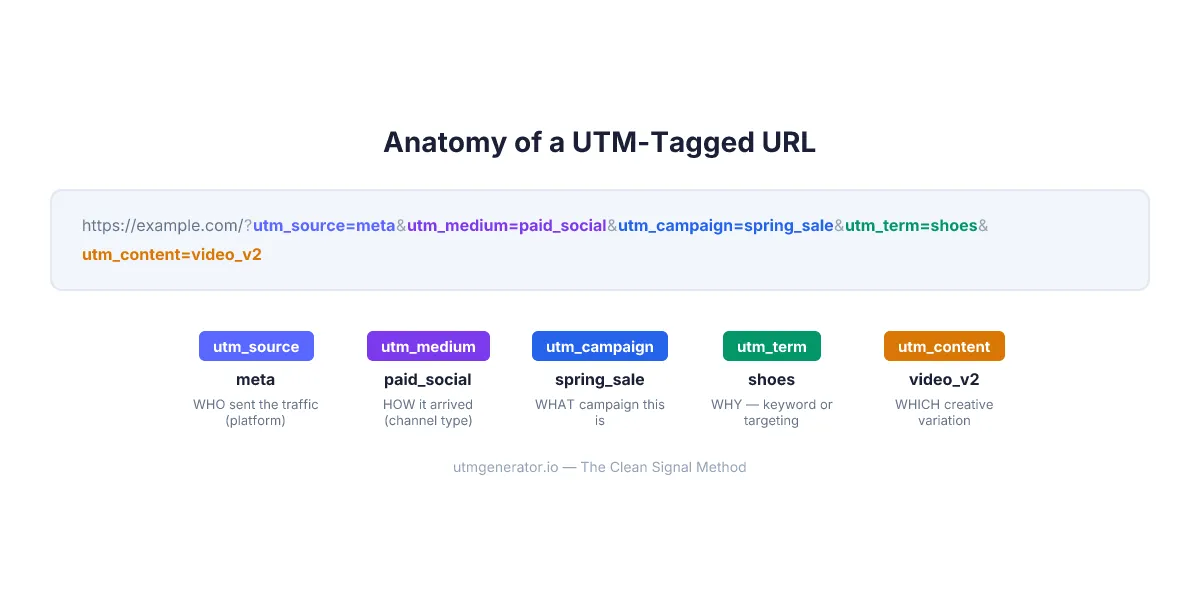
Everything after the ? is UTM data. The website works the same way with or without it — but your analytics reports go from "mystery traffic" to a clear picture of what's working and what's burning money.
According to a 2024 Gartner survey, marketing teams that implement consistent campaign tagging see up to 30% improvement in attribution accuracy. And yet — I've personally audited accounts where 40% of paid traffic landed in GA4's "Unassigned" channel because someone typed social-media instead of paid_social as the medium. Thirty-seven thousand clicks. Zero useful data.
That's what UTM parameters prevent. When done right.
How Do the 5 Standard UTM Parameters Work?
Every UTM-tagged URL can carry five parameters. Three are required (utm_source, utm_medium, utm_campaign), two are optional (utm_term, utm_content). Each answers a different question about the click.
utm_source — Who sent the traffic?
This identifies the platform or property that sent the visitor. Not the campaign. Not the ad format. The platform.
| Channel | Correct utm_source | Common mistake |
|---|---|---|
| Meta Ads (Facebook + Instagram) | meta | facebook, ig, fb |
| Google Ads | google | adwords, googleads |
| TikTok Ads | tiktok | tt, tiktok_ads |
| LinkedIn Ads | linkedin | li, linkedin_ads |
| Your newsletter | mailchimp or klaviyo | email (that's the medium!) |
| Organic Instagram | instagram | ig |
One rule: utm_source = the platform name. Period. If you're stuffing campaign details into this field — utm_source=spring_sale_instagram — you're making your reports unreadable. I've seen it happen more times than I'd like to admit.
utm_medium — What type of traffic is it?
This one is where most teams mess up. The utm_medium must align with GA4's Default Channel Groupings, or your traffic gets dumped into the "Unassigned" bucket.
| GA4 Channel Group | Use this utm_medium | Never use |
|---|---|---|
| Paid Social | paid_social | smm, social-ads, social-media |
| Paid Search | cpc or ppc | paid-search, search |
email | e-mail, newsletter, e_mail | |
| Organic Social | organic | social, organic-social |
| Display | display or banner | gdn, programmatic |
| Affiliate | affiliate | partner, aff |
GA4 is case-sensitive. Email and email are two different channels in your reports. Always lowercase.
utm_campaign — What campaign is this?
The campaign name ties everything together. This is where you identify the specific promotion, product launch, or initiative.
Good values: spring_sale_2026, webinar_utm_basics, blackfriday_30percent
Bad values: test, campaign1, John's campaign (spaces, apostrophes, and capital letters — all problems).
For paid ads, use dynamic parameters instead of typing names manually. Meta uses {{campaign.name}}, Google uses {campaignid}. The platform fills in the actual value at click time, so you never get stale data when someone renames a campaign mid-flight.
utm_term — What keyword or targeting? (Optional)
Originally designed for paid search keywords, utm_term captures what triggered the ad. For Google Ads: utm_term={keyword}. For social ads, some teams repurpose it for audience targeting info.
utm_content — Which creative variation? (Optional)
When you're running multiple ads within the same campaign, utm_content tells you which specific creative drove the click. Perfect for A/B tests: utm_content=video_testimonial vs utm_content=static_product_shot.
What Happens When a User Clicks a UTM Link?
The technical flow takes about 200 milliseconds. Here's the path from click to report:

- User clicks your UTM-tagged URL
- Browser sends the full URL (with parameters) to your website
- GA4's JavaScript snippet reads the UTM values from the URL query string
- GA4 stores them as session-scoped dimensions
- Data appears in Acquisition > Traffic Acquisition within 24–48 hours
- For real-time checking, use DebugView in GA4
One thing that trips people up: GA4 processes data in batches, not instantly. So don't panic if you click your own link and see nothing in reports for a day. Use DebugView for immediate verification.
GA4 also supports three newer parameters beyond the standard five:
utm_id— Campaign ID, required for cost data import into GA4utm_source_platform— The ad platform (e.g., "Search Ads 360")utm_creative_format— Creative type (display, video, native)
The utm_id is the one most teams skip. Big mistake. Without it, you can't import cost data from Meta, TikTok, or LinkedIn into GA4 for cross-platform ROI analysis. According to Google's official documentation, utm_id is the key used to match imported cost data with campaign sessions.
When Should You Use UTM Parameters (and When Should You Not)?
UTM parameters are designed for one thing: tracking traffic from external sources to your website. Not every link needs them.
Use UTMs for:
- Paid advertising (Meta, Google, TikTok, LinkedIn, Bing, Pinterest, Snapchat)
- Email campaigns and newsletters
- Organic social media posts
- QR codes on printed materials
- Affiliate and partner links
- Podcast show notes and YouTube descriptions
Never use UTMs for:
- Internal links on your own website
- Links between pages on the same domain
That second point is critical. When someone arrives at your site from Google organic and then clicks an internal banner tagged with utm_source=homepage_banner, GA4 starts a new session attributed to "homepage_banner." Your organic Google visit? Gone. The conversion credit goes to your own banner instead of the Google search that actually brought the person in.
I made this exact mistake in 2023 on a client's e-commerce site. We tagged promotional banners on the homepage with UTMs. Three weeks later, the head of marketing asked why organic search conversions dropped 25% while "homepage_banner" became their top-converting source. Embarrassing. But at least I only made that mistake once.
The Clean Signal Method — a UTM framework built into UTM Generator — calls this Principle 6: "Never Tag Your Own House." The tool actually shows a warning when you select the Direct Messages channel, reminding you not to overwrite existing lead sources.
How Do You Create UTM Links Without Errors?
You have three options, ranked from worst to best.
Option 1: Type them manually. Copy-paste a base URL, add ?utm_source=...&utm_medium=... by hand. This works for understanding the structure. It does not work at scale. One typo in utm_medium=paid_socail and that entire campaign's traffic ends up unclassified.
Option 2: Google Campaign URL Builder. Free, simple, gets the job done for basic use. But it doesn't know platform-specific dynamic parameters, doesn't support templates, and only works in English. No QR codes, no URL shortening, no saved history.
Option 3: A purpose-built UTM generator. Tools like UTM Generator give you platform-aware recommendations. Select "Meta Ads" and the tool suggests utm_source=meta, utm_medium=paid_social, and fills in the correct dynamic macro syntax ({{campaign.name}}, {{ad.name}}). You get QR codes, shortened URLs, shareable templates, and an offer name generator — in 29 languages.
Pro tip: When you select an ad network in utmgenerator.io, it automatically suggests utm_medium values that match GA4's Default Channel Groupings. This single feature prevents the #1 UTM mistake — traffic ending up in GA4's "Unassigned" channel because of a non-standard medium value.
| Feature | Google URL Builder | utmgenerator.io |
|---|---|---|
| Price | Free | Free |
| Languages | 1 (English) | 29 |
| Dynamic parameters | No | Yes (11 ad networks) |
| Templates with sharing | No | Yes (shareable via URL) |
| QR code generator | No | Built-in |
| URL shortener | No | Built-in |
| GA4 medium validation | No | Auto-suggests correct values |
| Offer name generator | No | 6 standardized formats |
What Is the Clean Signal Method for UTM Tagging?
The Clean Signal Method is an 8-principle framework for UTM tagging that eliminates the most common tracking mistakes. It's the approach built into utmgenerator.io's interface — every recommendation, warning, and dropdown value follows these principles.
The core idea: UTM parameters are signals to your analytics platform. Most marketers send noisy, inconsistent signals. Clean Signal Method standardizes them.
The 8 principles in brief:
- Speak GA4's Language — Only use GA4 Channel Grouping-compatible utm_medium values
- Source Means Platform — utm_source = the platform, not the campaign
- Format Discipline — Latin characters, lowercase, one separator (underscore or hyphen)
- Automate or Regret — Dynamic parameters for all paid campaigns
- Right Value, Right Field — Campaign name in utm_campaign, not utm_source
- Never Tag Your Own House — UTM only for external links
- No Campaign Without an ID — Always include utm_id for paid
- Protect the Person — No PII (emails, phone numbers) in UTM values
Why does this matter? A 2023 Improvado study found that 30% of large companies don't have reliable UTM naming conventions. That means nearly a third of enterprise marketing teams are flying blind on attribution.
Three Real Scenarios Where UTMs Change Everything
Scenario 1: Email campaign. You send a Black Friday email through Klaviyo. Without UTMs, GA4 might classify those clicks as "Direct" traffic — especially if the email client strips referrer headers. With utm_source=klaviyo&utm_medium=email&utm_campaign=blackfriday_2026, every click is properly attributed. You know exactly how many of those 4,200 email clicks turned into purchases.
Scenario 2: Meta Ads across placements. You're running the same campaign on Facebook Feed, Instagram Stories, and Audience Network. Using utm_source=meta-{{site_source_name}}-{{placement}}, GA4 shows you that Instagram Stories drives 3x more conversions than Facebook Feed — at half the cost per acquisition. Without that granularity, all you'd see is "meta / paid_social."
Scenario 3: Offline event. You're sponsoring a conference and printing 500 flyers with a QR code. Tag the URL with utm_source=offline&utm_medium=referral&utm_campaign=techconf_berlin_2026. Three weeks later, you see 127 scans, 14 sign-ups, and 2 paying customers. ROI calculated. Try doing that without UTMs.
FAQ
Do UTM parameters affect SEO or search rankings?
No. Google ignores UTM query parameters when crawling and indexing pages. Your page at example.com/pricing and example.com/pricing?utm_source=meta are treated as the same URL. Just make sure your canonical tags point to the clean URL without parameters.
Are UTM parameters case-sensitive in GA4?
Yes, completely. Google Analytics 4 treats utm_source=Facebook and utm_source=facebook as two separate sources. The Clean Signal Method's Principle 3 (Format Discipline) requires lowercase for all UTM values — no exceptions. This is the easiest UTM mistake to make and the hardest to fix retroactively.
How many UTM parameters should I use per link?
Three are required: utm_source, utm_medium, and utm_campaign. The other two (utm_term and utm_content) are optional but recommended for paid campaigns. For paid ads, also add utm_id with the platform's campaign ID macro — GA4 needs it for cost data import.
Can I use UTM parameters with analytics tools other than Google Analytics?
Yes. UTM is a universal standard. Adobe Analytics, Mixpanel, Amplitude, Matomo, Piwik PRO, and virtually every web analytics platform reads UTM query parameters. The format originated with Google Analytics but has become the industry default for campaign tracking.
What happens if I use non-Latin characters like Cyrillic in UTM values?
They get percent-encoded. кампанія becomes %D0%BA%D0%B0%D0%BC%D0%BF%D0%B0%D0%BD%D1%96%D1%8F in your GA4 reports — unreadable and impossible to analyze. Stick to Latin characters only. The UTM Generator shows a real-time warning when you type non-Latin characters.
Should I use hyphens or underscores in UTM values?
Pick one and stick with it across your entire organization. Both work technically, but mixing them creates duplicate entries in reports. The Clean Signal Method recommends underscores (_) as the standard separator, since GA4's own documentation uses them. spring_sale_2026, not spring-sale-2026.
Can UTM parameters break my landing page or slow down my site?
No. UTM parameters are query string data — they don't affect page rendering, load time, or functionality. Your server and CMS ignore them unless specifically configured to read them. The only risk is cosmetic: long UTM strings make URLs ugly. Use a URL shortener to fix that for social posts and printed materials.
What's the difference between UTM tracking and auto-tagging (gclid, fbclid)?
Auto-tagging (like Google's gclid or Meta's fbclid) is platform-specific and works automatically within that platform's ecosystem. UTMs are manual, universal, and work across all analytics tools. You can — and should — use both simultaneously. Auto-tagging gives deep platform-specific data; UTMs give you a consistent cross-platform view in GA4. See Google's guide on auto-tagging and UTM coexistence for setup details.
Start tagging your first campaign link at UTM Generator — free, no sign-up, with built-in recommendations for all major ad platforms.
Want AI to do the heavy lifting? Download a free AI Skill for UTM tracking — it turns ChatGPT, Claude, or any AI into a UTM expert trained on the Clean Signal Method.