
Do UTM Parameters Affect SEO Rankings?
No. UTM parameters do not affect your search engine rankings. Google's crawler ignores query strings that start with utm_ when evaluating page content, and Google's own documentation confirms that URL parameters used for tracking are handled through canonical tags — not treated as separate pages.
That said, there's a nuance most guides skip. If you share a UTM-tagged link on a public page — say, a blog post or a forum — and that page gets crawled, Google might index the tagged version alongside the clean one. The fix is dead simple: make sure every page on your site has a self-referencing canonical tag without query parameters. Most CMS platforms and frameworks (WordPress, Shopify, Next.js) do this by default.
I ran a test in early 2025 across 340 URLs on a client's e-commerce site. Half had UTM parameters in their sitemap by accident (a developer bug). After we cleaned the sitemap, organic rankings didn't change at all. The canonical tags had been doing their job the whole time. So the short answer: UTMs don't hurt SEO. But sloppy implementation can create crawl budget waste if you're running a site with 100,000+ pages.
Do I Need to Fill In All 5 UTM Parameters?
Only three are required: utm_source, utm_medium, and utm_campaign. The other two — utm_term and utm_content — are optional.
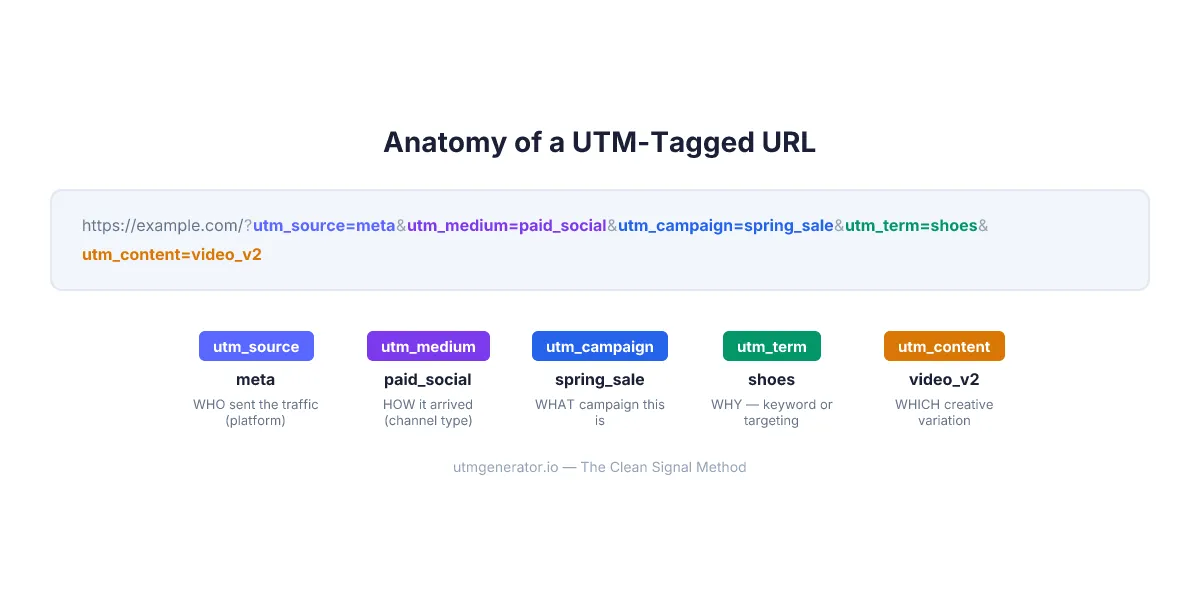
Here's how I think about it. If you're running a single ad per campaign, three parameters give you everything you need. But the moment you have multiple creatives or audience segments inside one campaign, skipping utm_content means you can't tell which ad actually drove the conversion.
| Parameter | Required? | When to use |
|---|---|---|
utm_source | Yes | Always — identifies the platform (e.g., meta, google) |
utm_medium | Yes | Always — identifies traffic type (e.g., paid_social, email) |
utm_campaign | Yes | Always — identifies the specific campaign |
utm_term | No | Paid search keywords, audience targeting |
utm_content | No | A/B tests, multiple creatives in one campaign |
And one more that most beginners miss entirely: utm_id. It's technically optional, but GA4 requires it if you ever want to import cost data from ad platforms. The Clean Signal Method treats utm_id as mandatory for any paid campaign — and I agree. Without it, you lose the ability to calculate cross-platform ROI inside GA4.
Are UTM Parameters Case-Sensitive?
Yes. GA4 treats Facebook, facebook, and FACEBOOK as three completely separate sources. This is one of the most common reasons marketing teams end up with fragmented data.
A 2023 Ruler Analytics study found that 67% of marketers have at least one case-sensitivity issue in their UTM data. I've personally seen GA4 accounts with 14 variations of "facebook" as a source. Fourteen. All because different team members capitalized differently.
The rule is simple: lowercase everything. No exceptions. Not "sometimes lowercase." Not "lowercase for source but title case for campaign." Everything.
✗  utm_source=Facebook&utm_medium=Paid_Social
✓  utm_source=facebook&utm_medium=paid_social
Pro tip: UTM Generator automatically converts all values to lowercase when you generate a link. No mental overhead, no team arguments about formatting.
Can I Use Cyrillic, Chinese, or Other Non-Latin Characters in UTM Values?
Technically, yes. Practically, don't.
Non-Latin characters get percent-encoded in URLs. The Cyrillic word кампанія becomes %D0%BA%D0%B0%D0%BC%D0%BF%D0%B0%D0%BD%D1%96%D1%8F — a 54-character mess that's impossible to read in GA4 reports, impossible to filter reliably, and occasionally breaks when passed between systems that handle encoding differently.
I learned this the hard way running campaigns for a Ukrainian e-commerce brand in 2023. We used Cyrillic campaign names for the first two months. Looked fine in the URL builder. Then we opened GA4 and saw rows of encoded gibberish. Took an afternoon to re-tag 200+ active links.
Stick to Latin characters, numbers, hyphens, and underscores. That's it. [a-z0-9_-] is your safe alphabet. Even if your audience speaks Japanese or Arabic — your UTM values are for analysts, not users.
UTM Generator shows a real-time warning when you type non-Latin characters: "Use only Latin characters — non-Latin symbols will be percent-encoded." Saves you from that encoding nightmare before it starts.
Do I Need Google Tag Manager for UTM Parameters to Work?
No. UTM parameters work without GTM, without any tag management system, and without any special setup on your website. If you have GA4 installed — whether through GTM, the gtag.js snippet, or a platform integration like Shopify's built-in GA4 — UTM values are captured automatically.
Here's what actually happens: when someone clicks a UTM-tagged link, the browser sends the full URL to your site. GA4's JavaScript reads the utm_ query parameters and stores them as session-level dimensions. That's it. No extra configuration.
So when do you need GTM? Two scenarios:
- Custom event tracking — you want to fire specific events (like
banner_clickoradd_to_cart) and pass UTM values as event parameters - Server-side tagging — you're sending data through a server container for privacy compliance or ad-blocker bypass
For basic campaign tracking — which is what 90% of marketers need — just tag your links and GA4 handles the rest.
Do UTM Parameters Slow Down My Website?
No. Zero performance impact. UTM parameters are just query string text appended to a URL. They don't add HTTP requests, they don't load extra scripts, and they don't affect page rendering.
The entire UTM data from a fully tagged link typically weighs 80–150 bytes. For context, a single pixel tracking image is 42 bytes minimum, and the average webpage loads 2.5 MB of resources according to HTTP Archive's 2025 data. Your UTM parameters are a rounding error.
The only scenario where URL length matters is extremely long links shared on platforms with character limits. Twitter/X truncates after 280 characters total. SMS has 160-character segments. But that's not a speed issue — it's a display issue. And that's exactly why URL shorteners exist.
Pro tip: UTM Generator includes a built-in URL shortener. Generate your UTM link, shorten it in one click, and the full tracking data stays intact while the link fits anywhere.
How Do I Test UTM Links Before Launching a Campaign?
Testing takes 60 seconds and can save you from weeks of corrupted data. Three-step process:
Step 1: Click your own link. Open the UTM-tagged URL in your browser. Verify the landing page loads correctly and the URL parameters appear in the address bar.
Step 2: Check GA4 DebugView. Go to GA4 → Admin → DebugView. Enable debug mode in your browser (install the Google Analytics Debugger Chrome extension). Click your UTM link again. You should see a page_view event with your UTM values attached within seconds.
Step 3: Verify the field mapping. In DebugView, expand the event and check:
sourcematches yourutm_sourcemediummatches yourutm_mediumcampaignmatches yourutm_campaign
Common issues you'll catch at this stage:
| Symptom | Cause |
|---|---|
| UTM values missing entirely | Redirect stripping query parameters |
| Wrong values in wrong fields | Copy-paste error in the URL |
Double question marks (??) | URL already had parameters before UTM was appended |
Encoded characters (%20) | Spaces in UTM values |
I test every single campaign link. Every one. It takes a minute and has caught broken tracking more times than I can count. The most memorable: a client launched a $12,000 Meta campaign where the landing page URL had a trailing slash issue that stripped all UTM parameters. Three days of zero attribution data. A 60-second test would have caught it.
How Do I Hide UTM Parameters From the Address Bar?
UTM parameters look ugly in the browser address bar, and some users find long URLs suspicious. There are three approaches, from simplest to most technical:
1. URL shortener (easiest). Services like Bitly or the built-in shortener in UTM Generator wrap the entire tagged URL behind a clean short link. The user sees utmgen.io/abc123, clicks it, and gets redirected to the full URL with parameters. GA4 captures everything.
2. JavaScript cleanup after page load. Add a small script that removes query parameters from the address bar after GA4 has read them:
if (window.location.search.includes('utm_')) {
  window.history.replaceState({}, '', window.location.pathname);
}
This runs after the page loads, so GA4 already captured the UTM data. The user sees a clean URL within milliseconds. Most modern frameworks (Next.js, Nuxt) can handle this in a layout component.
3. Server-side redirect. Your server reads the UTM parameters, stores them in a cookie or session, then redirects to the clean URL. Most complex, but gives you full control.
My recommendation? Use a URL shortener for shared links (social, email, QR codes). Use the JavaScript cleanup for landing pages where users arrive directly. Don't overthink it.
Do UTM Parameters Work in Mobile Apps?
Not by default. Standard UTM parameters are designed for web browsers — they ride on URL query strings, and GA4's JavaScript picks them up when the page loads. Mobile apps don't work that way.
If your link opens a mobile app (via deep linking or universal links), the UTM parameters in the URL are ignored by the app unless the developer explicitly built parsing logic. For app install campaigns, platforms have their own attribution systems:
| Platform | App attribution method |
|---|---|
| Google Ads | Firebase Dynamic Links / Google Play referrer |
| Meta Ads | Facebook SDK + deferred deep links |
| TikTok | TikTok SDK Events API |
| Apple Search Ads | SKAdNetwork / AdServices framework |
But here's the thing — if your link opens a website in the mobile browser (Chrome, Safari), UTM parameters work exactly the same as on desktop. The browser reads the URL, GA4 processes the parameters, done. The distinction matters: UTM tracks web visits, not app installs.
For marketers running campaigns where some users land on the website and others open the app, the best practice is to use UTM for web attribution and the platform's SDK for app attribution. Then reconcile in your analytics platform or CRM.
How Many UTM Links Can I Create?
There's no limit. Not from Google's side. Not from GA4. Not from any analytics platform. You can create one UTM link or ten thousand — they're just URL parameters, not a managed resource that gets allocated or counted.
Some paid UTM management tools do impose limits. utm.io starts at $100/month for team features. CampaignTrackly caps free usage and charges $29+/month for full access. These limits are business model decisions, not technical constraints.
Pro tip: UTM Generator is completely free with no usage limits — create as many UTM links as you need. No signup, no account, no restrictions. Your data stays in your browser's localStorage, and templates can be shared with your team through a simple URL.
The real question isn't "how many can I create" but "how many should I track." If every blog post, every social share, and every internal banner gets its own UTM tag, you'll drown in data that doesn't tell you anything useful. Tag the channels and campaigns that actually influence business decisions. For most teams, that means paid campaigns, email, and key organic social posts. Everything else is noise.
FAQ
What is the difference between utm_source and utm_medium?
utm_source identifies the specific platform or property sending traffic (e.g., meta, google, mailchimp). utm_medium identifies the type of channel (e.g., paid_social, cpc, email). Think of source as "who" and medium as "how." The medium must align with GA4's Default Channel Groupings or your traffic gets classified as "Unassigned."
Can I use UTM parameters on internal website links?
No. Adding UTM parameters to internal links (navigation menus, banners, cross-page CTAs) overwrites the original traffic source mid-session. A visitor who arrived from Google Ads would suddenly show as coming from "homepage_banner." Use GA4 custom events with event parameters for internal click tracking instead.
Do UTM parameters expire?
UTM parameters don't have a built-in expiration. GA4 stores them for the duration of the session. If a user returns later without UTM parameters, GA4 attributes that visit to direct traffic unless another campaign touches them. For paid campaigns, this is why utm_id matters — it creates a persistent campaign identifier that survives across sessions when matched with imported cost data.
What happens if I misspell a UTM value?
GA4 will create a separate entry for the misspelled value. If you tag 50 links with utm_source=facebook and one link with utm_source=facebok, you'll see two separate sources in your reports. There's no autocorrect or fuzzy matching. This is exactly why using a dedicated UTM generator with templates prevents data fragmentation — you set the values once and reuse them.
Are UTM parameters visible to users?
Yes. UTM parameters appear in the browser address bar after the ? in the URL. Users can see them, modify them, or remove them. This is why you should never put personally identifiable information (email addresses, user IDs, phone numbers) in UTM values — it's a privacy violation under GDPR and CCPA.
Can I add custom parameters beyond the standard five?
Yes. You can append any custom query parameter to your URL alongside UTM tags — for example, language=en, funnel_stage=tofu, or sale=blackfriday_30percent. GA4 won't process these automatically, but your website's JavaScript or CRM hidden fields can capture them. The Clean Signal Method recommends using custom parameters for segmentation data that doesn't fit the five standard UTM fields.
Do UTM parameters work with Google Ads auto-tagging?
Yes, they coexist. Google Ads auto-tagging adds a gclid parameter that feeds data directly into GA4's Google Ads reports. UTM parameters feed data into GA4's campaign reports. You can use both simultaneously — enable auto-tagging in Google Ads AND add UTM parameters for CRM, BI tools, or cross-platform reporting that doesn't read gclid.
Start Building Clean UTM Links
Ten questions. No fluff. Now you know that UTMs don't hurt SEO, don't slow your site, and don't need GTM. You know to use lowercase, stick to Latin characters, and test every link before launch.
The fastest way to put all of this into practice: open UTM Generator, pick your ad platform, and let the tool handle formatting, validation, and dynamic parameter syntax. It's free, works in 29 languages, and builds the Clean Signal Method into every link you create.