
What Are the Five UTM Parameters and What Does Each One Do?
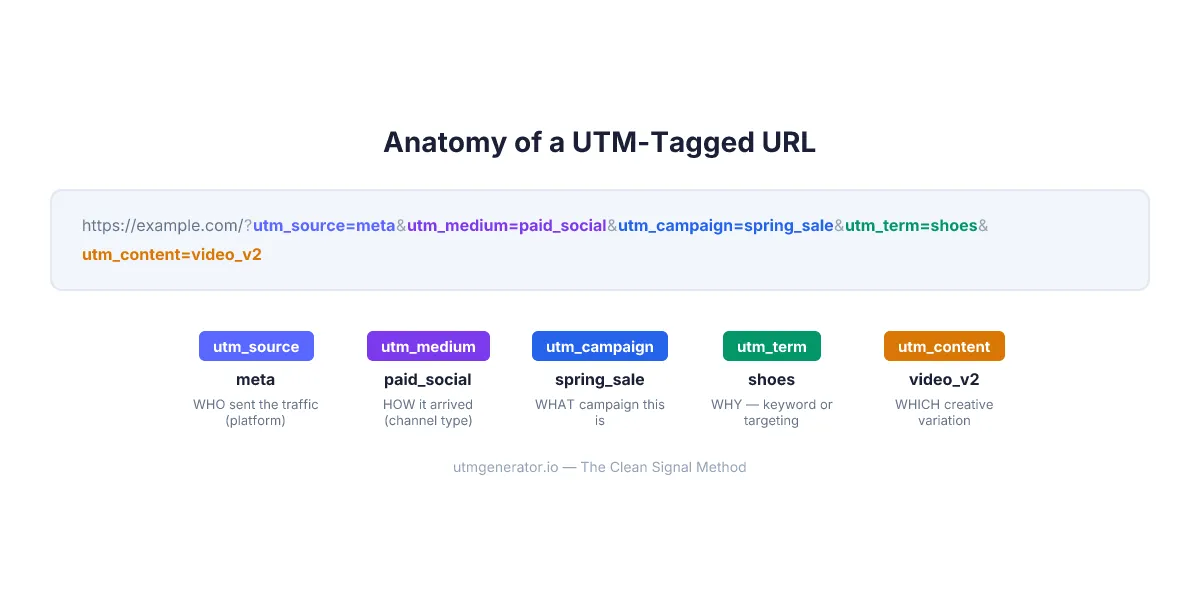
UTM parameters are five tags — utm_source, utm_medium, utm_campaign, utm_term, and utm_content — appended to any URL to tell Google Analytics 4 exactly where a click came from. Three are required (source, medium, campaign), two are optional (term, content). Every marketing team running paid ads needs all five.
Here's what each parameter answers:
| Parameter | Question it answers | Example value |
|---|---|---|
utm_source | WHO sent the traffic? | meta, google, klaviyo |
utm_medium | HOW did it arrive? | paid_social, cpc, email |
utm_campaign | WHAT campaign is this? | spring_sale_2026, {{campaign.name}} |
utm_term | WHY — what targeting or keyword? | running_shoes, {keyword} |
utm_content | WHICH specific creative? | video_v2, {{ad.name}} |
Think of it like a shipping label. Source is the sender. Medium is the shipping method. Campaign is the order number. Term is the reason for the order. Content is which box in the shipment. Miss one label, and your package ends up in the wrong warehouse — or in GA4's "Unassigned" channel, which is worse.
Why Do Marketers Confuse utm_source and utm_medium?
The source vs. medium mix-up is the single most common UTM mistake, responsible for corrupted GA4 reports across an estimated 30% of companies that lack documented UTM conventions, according to a 2023 Improvado study. The confusion is simple: both feel like they describe "where the traffic came from."
But they answer different questions. utm_source identifies the platform — the specific website, app, or service that sent the click. utm_medium identifies the channel type — the category of traffic in GA4's Default Channel Groupings.
Here's where it breaks:
| What they typed | What went wrong |
|---|---|
utm_source=paid_social | That's a medium, not a source. Source should be the platform: meta, tiktok |
utm_medium=facebook | That's a source, not a medium. Medium should be the channel type: paid_social |
utm_source=spring_sale_instagram | Campaign name stuffed into source. Three fields collapsed into one |
utm_medium=social-media | Not a GA4-recognized value. Traffic lands in "Unassigned" |
I made this exact mistake in 2022. Tagged an entire Q4 campaign with utm_medium=social instead of utm_medium=paid_social. Every Meta ad click landed in GA4's "Organic Social" channel. Three months of paid attribution data — gone. The $14,000 ad spend looked like it produced zero results.
The fix is dead simple. Source = platform name. Medium = GA4 channel grouping value. Always.
The Clean Signal Method calls this "Speak GA4's Language" — Principle #1. If your utm_medium value doesn't match a GA4 Default Channel Grouping, your data is already broken before the first click.
What Are the Recommended UTM Values for Every Marketing Channel?
GA4 uses utm_medium to sort traffic into Default Channel Groupings. Use the wrong value and your traffic becomes "Unassigned" — invisible in standard reports. Here are the correct values for 16 common channels:
| Channel | utm_source | utm_medium | utm_campaign example |
|---|---|---|---|
| Meta Ads (FB + IG) | meta | paid_social | {{campaign.name}}-{{adset.name}} |
| Google Ads (Search) | google | cpc | {campaignid}_{adgroupid} |
| Google Ads (Display) | google | display | {campaignid} |
| TikTok Ads | tiktok | paid_social | __CAMPAIGN_NAME__ |
| LinkedIn Ads | linkedin | paid_social | {{CAMPAIGN_NAME}} |
| Bing/Microsoft Ads | bing | cpc | {CampaignId} |
| Pinterest Ads | pinterest | paid_social | {campaign_name} |
| Snapchat Ads | snapchat | paid_social | {{campaign.name}} |
| Mailchimp newsletter | mailchimp | email | weekly_digest_2026-03 |
| Klaviyo email | klaviyo | email | abandoned_cart_flow |
| Organic Facebook post | facebook | organic | product_tips_march |
| Organic Instagram post | instagram | organic | behind_the_scenes |
| Telegram channel | telegram | organic | weekly_update |
| YouTube organic | youtube | organic | tutorial_series |
| QR code (offline) | offline | referral | conference_berlin_2026 |
| SMS campaign | sms_provider | sms | flash_sale_march |
Notice a pattern? Every utm_medium value maps directly to a GA4 Default Channel Grouping. No creative spellings. No abbreviations. paid_social — not smm, not social-ads, not paid-social-media.
Pro tip: When you select an ad network in UTM Generator, the medium dropdown shows only GA4-compatible values. Pick "Meta Ads" and you see
paid_social,cpm,cpc— never values that would trigger "Unassigned." The guesswork disappears.
How Do You Use utm_term and utm_content for Granular Tracking?
These two optional parameters separate good UTM tracking from great UTM tracking. utm_term captures targeting data — the keyword, audience segment, or match type that triggered the ad. utm_content identifies which specific creative the user clicked.
For Google Ads, utm_term is straightforward:
utm_term={keyword}_{matchtype}
This gives you rows like running_shoes_exact or best_sneakers_broad in GA4. You can see which keywords drive conversions without opening Google Ads at all.
For social platforms without keyword targeting, repurpose utm_term for audience data:
utm_term=lookalike_purchasers_1pct    (Meta)
utm_term=job_title_cmo                 (LinkedIn)
utm_term=interest_fitness              (TikTok)
utm_content should always identify the creative. Every platform has a macro for this:
| Platform | utm_content value | What it resolves to |
|---|---|---|
| Meta | {{ad.name}} | Your ad name in Ads Manager |
{creative} or {adid} | The creative ID | |
| TikTok | __CID_NAME__ | Creative name |
{{CREATIVE_ID}} | Creative ID |
And here's a technique I wish I'd learned earlier: use utm_content for A/B testing organic posts too. Tag one LinkedIn post with utm_content=carousel_v1 and another with utm_content=text_only_v2. GA4 shows you which format drives more traffic — no paid tool required.
What Goes Wrong When Values End Up in the Wrong Field?
Putting the right value in the wrong parameter is like writing the ZIP code in the city field on a letter. Technically you filled in the form. Practically, the data is useless.
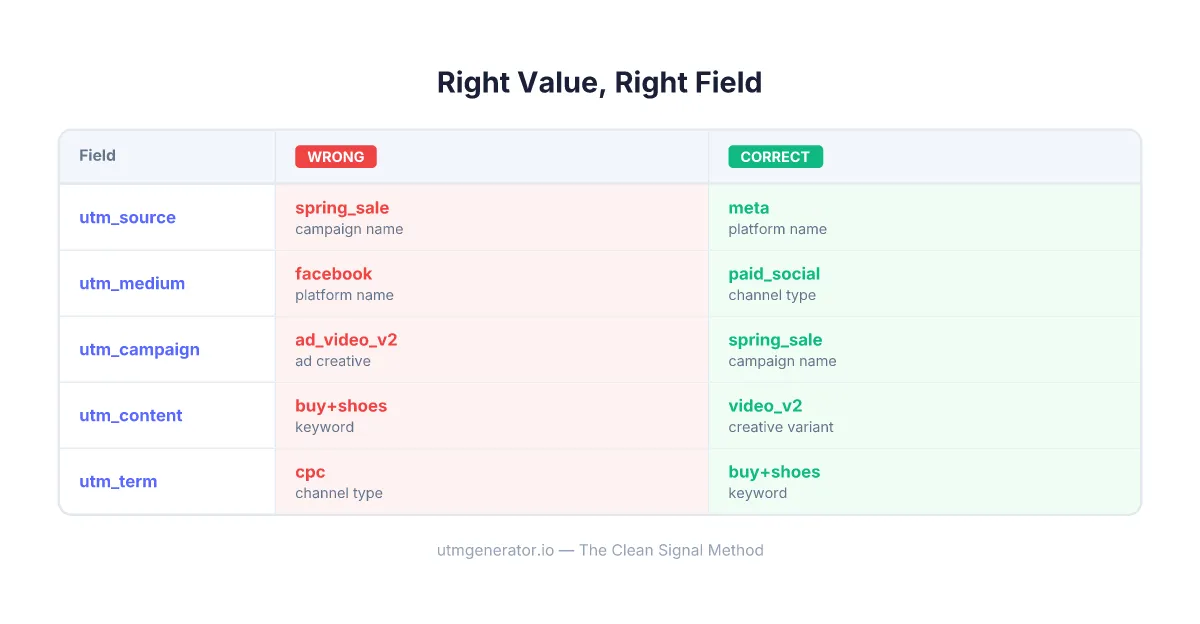
Here are the five mistakes I see most often when auditing client UTM setups:
| Mistake | What they wrote | What it should be |
|---|---|---|
| Campaign name in source | utm_source=spring_sale | utm_source=meta, utm_campaign=spring_sale |
| Platform in medium | utm_medium=facebook | utm_source=meta, utm_medium=paid_social |
| Ad name in campaign | utm_campaign=ad_video_v2 | utm_campaign={{campaign.name}}, utm_content=ad_video_v2 |
| Keyword in content | utm_content=buy+shoes | utm_term=buy+shoes |
| Everything in one field | utm_source=meta_paid_spring_2026 | Split across source, medium, campaign |
The Clean Signal Method principle "Right Value, Right Field" exists specifically because this problem is so widespread. When every value sits in its designated field, GA4 reports become instantly readable. When they don't, you're debugging spreadsheets instead of optimizing campaigns.
What Are the New GA4 Parameters Beyond the Classic Five?
Google Analytics 4 supports three additional UTM parameters that most marketers don't know about — utm_id, utm_source_platform, and utm_creative_format. These were introduced with GA4 and are becoming increasingly important in 2026.
utm_id — The campaign identifier. Required for GA4 cost data import. Without it, you can't match your ad spend data back to GA4 sessions. Every paid campaign should include it:
| Platform | utm_id value |
|---|---|
| Meta | {{campaign.id}} |
{campaignid} | |
| TikTok | __CAMPAIGN_ID__ |
{{CAMPAIGN_ID}} | |
| Bing | {CampaignId} |
Here's why utm_id matters beyond cost import: campaign IDs don't change when someone renames a campaign. I've watched marketing managers rename "Spring Sale" to "March Promo" mid-flight and break every utm_campaign join in their reports. The numeric ID from utm_id stays stable. It's your insurance policy against human error.
utm_source_platform — Identifies the platform sending the traffic at a higher level. Google uses this internally for Google Ads auto-tagging, but you can set it manually for other platforms. Values: Search Ads 360, Display & Video 360, Shopping. Most marketers can skip this unless they use Google Marketing Platform products.
utm_creative_format — Describes the ad format: display, native, video, search. Useful for cross-platform format comparison, but still seeing low adoption. GA4 will populate this from auto-tagging for Google Ads.
The bottom line: utm_id is the only new parameter you must use. The other two are nice-to-have for enterprise setups.
How Does utmgenerator.io Help You Pick the Correct Values?
Knowing the theory is one thing. Getting it right at 11 PM before a campaign launch is another.
When you select an ad network in UTM Generator, three things happen automatically. The source field populates with the platform name and available dynamic macros — for Meta, that's meta, meta-{{site_source_name}}-{{placement}}, or just {{placement}}. The medium dropdown filters to only GA4-compatible values for that network. And every field shows a tooltip explaining what goes there, with the correct macro syntax for your selected platform.
The tool also prevents the most expensive mistakes in real time:
- Cyrillic characters? Warning: "Use only Latin characters — non-Latin symbols will be percent-encoded."
- Mixed case? Auto-lowercased at generation.
- Wrong field? Recommended values steer you to the right parameter.
- Missing
utm_id? The field is pre-populated with the correct platform macro.
Templates take this further. Build one correct UTM structure for Meta campaigns, save it as a template, and share the URL with your team. They open the link — all fields auto-populate. No training deck, no governance document, no $100/month SaaS subscription. Just a URL that enforces your naming convention by default.
FAQ
What is the difference between utm_source and utm_medium?
utm_source identifies the specific platform or website that sent the traffic — like meta, google, or klaviyo. utm_medium identifies the type of marketing channel — like paid_social, cpc, or email. Source answers "who sent it," medium answers "how it arrived." GA4 uses medium values to sort traffic into Default Channel Groupings.
Which UTM parameters are required?
Three parameters are required for GA4 to properly attribute traffic: utm_source, utm_medium, and utm_campaign. Without all three, the session data may appear incomplete or fall into the wrong channel grouping. The other two — utm_term and utm_content — are optional but recommended for paid campaigns that need creative-level attribution.
What happens if I use the wrong utm_medium value?
GA4 maps utm_medium to Default Channel Groupings using specific recognized values. If you use social-media instead of paid_social, your traffic lands in the "Unassigned" channel — a dead zone where data becomes invisible in standard acquisition reports. According to GA4 documentation, only values like cpc, paid_social, email, display, organic, and affiliate are recognized.
Should I use dynamic parameters or hardcoded values?
Use dynamic parameters (platform macros) for any value that might change — campaign names, ad names, keywords, creative IDs. Use static values for things that stay constant — your utm_medium and base utm_source. The Clean Signal Method recommends combining both: utm_source=meta-{{site_source_name}}-{{placement}} uses a static prefix with dynamic platform data.
Is utm_term only for search keywords?
No. While utm_term was originally designed for paid search keywords, you can repurpose it for any targeting data on social platforms — audience segments, interest categories, job titles, or demographic groups. For Google Ads, use {keyword}. For Meta, try descriptive values like lookalike_purchasers_1pct or retargeting_cart_abandoners.
Do UTM parameters work with GA4 auto-tagging?
Yes. Google Ads auto-tagging (GCLID) and manual UTM parameters can coexist. Enable "Allow manual tagging to override auto-tagging" in GA4 Admin settings. Auto-tagging provides detailed Google Ads data in GA4's Google Ads reports, while UTM parameters feed the standard acquisition reports and work with external tools like CRMs and BI platforms.
What is utm_id and do I need it?
utm_id is a GA4-specific parameter that stores a campaign identifier — typically the platform's numeric campaign ID. It's required for importing cost data into GA4 and provides a stable key that survives campaign renames. For paid campaigns, always include it using the platform macro: {{campaign.id}} for Meta, {campaignid} for Google, __CAMPAIGN_ID__ for TikTok.
How many UTM parameters can I add to one URL?
There is no hard limit on the number of parameters. Beyond the five standard UTMs and three GA4 additions, you can add custom parameters like language, funnel_stage, or sale for CRM integration. The practical limit is URL length — most browsers handle URLs up to 2,048 characters. Use UTM Generator to build links with both standard and custom parameters, then shorten them for social media and QR codes.
Stop guessing which value goes where. Open UTM Generator, select your ad network, and let the platform-specific recommendations handle the rest. Free, no sign-up, works in 29 languages.